
Gini Pay Photo Payment – snap, check, pay.
Transfer a bill in seconds with the number one feature in the largest German retail banking apps.











Pay your bills with a snap.
Gini Pay Photo Payment turns your mobile camera into a smart time-saving machine. Optimal user experience and highly specialized AI have made our automagic payment process the new industry standard, convincing millions of users every day. No matter if you make a snap of your bill, scan the giro code or share a digital receipt with your banking app – wiring money has never been so easy.
Gini Pay Photo Payment – How It Works
Transfer money
the smart way.
Pay your bills by scan without typing the recipient’s details – the Gini Pay photo transfer has become the standard in German banking apps. Regardless of your invoice is a scan, e-bill, or are photo of your mobile camera, all relevant payment details automatically get extracted to prefill the transfer form and save your time.
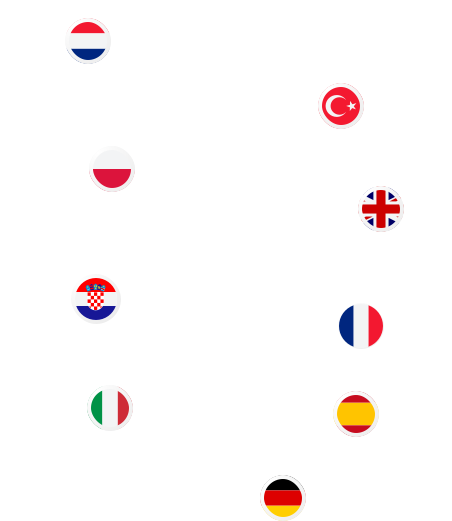
And the best part: the photo transfer understands documents in German, English, French, Italian, Dutch, Polish, Serbo-Croatian, Spanish and Turkish – simply automatically.

9 languages
compatible with photo payment

Share With Your Banking App
PDF or screenshot?
Share it with your mobile banking app.
The payment details came by e-mail? A friend sent his bank account details in a chat?
Open the PDF or screenshot from your gallery, and select the banking app by the share-with-button – done.
The photo payment extracts the payment data from various formats, whether PDF, JPEG, PNG, or GIF, in the most convenient way.
Gini Pay Photo Payment – Upgrades
Photo Payment 2.0: Purchase on account, paid smartly.
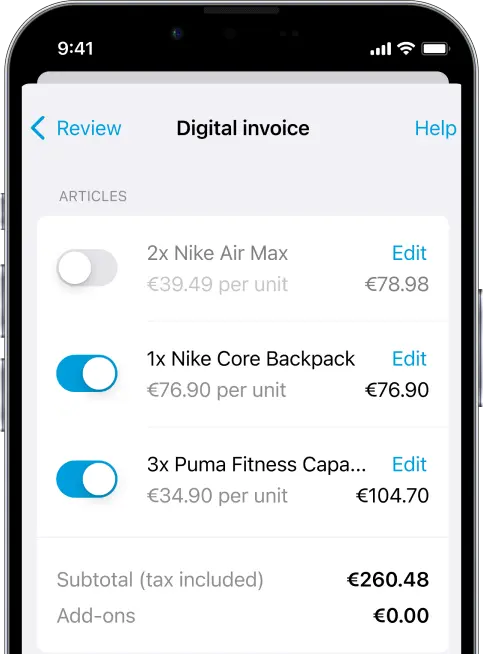
Mobile banking must not stand still: Today, mobile-first also means customer-first. That’s why we strive to make the Gini Pay Photo Payment even more convenient and compelling – with useful add-ons to simplify life.

Gini Pay Connect – Benefits
The No. 1 feature in mobile banking.
Gini Pay photo payment is the digital hero of leading German banks. Unmatched in terms of extraction quality, speed, and security, the photo payment is the favorite convenience feature of all bank customers. After all, everyone deserves a magic moment.

194,979,000+ documents
scanned and paid in 2025

92.7% accuracy
in data extraction

1.7 seconds
avg. processing time

7,220,610 users
monthly active in 2025
App Reviews
Happy customers make everyone happy.
Contact us


Photo payment – smart, secure, fast
Giro code recognition with Gini Pay: Scan instead of type
With the Giro code, making a transfer is effortless. Gini Pay photo transfer recognizes not only text, PDFs, and screenshots, but also QR codes like the Giro code: simply scan the invoice – and all payment details are immediately available. This makes paying every invoice even faster – contactless, error-free, and automatically filled in.
Data protection made in Germany
Sensitive data requires sensitive handling. That’s why Gini processes your photo transfers in compliance with GDPR in certified data centers in Munich. There, all data remains encrypted and protected from unauthorized access. Strong Customer Authentication (SCA) via the banking app, a tested data center infrastructure, and full transport encryption ensure that every transfer is not only fast but also secure.
Photo payment as a technological pioneer
There is much more to photo payment than meets the eye. What seems simple at first glance – taking a photo of a bill and automatically triggering a transfer – is powered by complex deep learning processes behind the scenes. Gini uses its own specially developed neural networks to read even hard-to-decipher documents reliably. Techniques like adaptive generation of binary images and continuous model training with real-world usage data make it possible to extract information from a wide variety of sources like scans, photos, or PDFs within fractions of a second, with an accuracy rate exceeding 91%. Photo payment exemplifies how technological excellence and user-centric design can work hand in hand to simplify everyday tasks significantly.
Traditional methods are a thing of the past – why photo transfers are smarter
A traditional bank transfer involves typing in the IBAN, finding the amount, checking the payment reference, and hoping there are no typos. Photo transfers via smartphone are simpler, faster, and more secure. A photo or PDF is all it takes, and all payment details are automatically recognized and correctly transferred. No typing, no scrolling, no stress.
The difference? Less effort, more convenience, and a significantly improved mobile banking experience.
This is how photo payment works
With photo transfer, you can make payments quickly and intuitively. Your banking app does all the preliminary work; all you have to do is confirm:
- Open the app: Open your online banking app on your smartphone and start the photo transfer.
- Capture the invoice: Take a picture of the invoice or transfer slip with your smartphone camera. The photo transfer feature automatically recognizes the invoice details within the frame on the display.
- Verify the data: The banking app automatically recognizes all the relevant data, without any typing. The IBAN, amount, purpose, and recipient are transferred directly to the transfer form. You simply check the information and correct it if necessary.
- Confirm the transfer: Finally, authorize the transfer as usual, via pushTAN, chipTAN, or biometric authentication.
Photo payment as a secure option.
Technically and from a regulatory perspective, photo payment is equivalent to a standard SEPA transfer – it is processed exactly like a manually entered transfer in the banking app. The same security standards apply as required for all online payment transactions in Germany. These include strong customer authentication (SCA), the use of TAN procedures, and end-to-end encryption of sensitive data during transmission. In addition, each bank may implement its own security measures, such as time restrictions, geofencing, or fraud detection systems based on behavioral patterns. Photo payment integrates seamlessly into the existing security framework of digital banking.
Another important aspect of security is error prevention: When manually entering an IBAN, amount, or payment reference, it’s easy to make mistakes such as transposed digits or omissions. The automated data recognition in photo payment significantly reduces such familiar sources of error. With intelligent text recognition (OCR), the likelihood of incorrect or incomplete transfers is noticeably lower. In practice, this enhances user experience and improves transaction security.
In summary:
Photo payment is not only as secure as a traditional online transfer, but it can actually contribute to even safer processing.
Benefits that pay off.
With photo payment, banking is as easy as taking a snapshot – no annoying typing, no IBAN entry, just take a photo and pay. This saves customers time and makes the banking app a real everyday helper. No wonder it is one of the most frequently used features.
For banks, this means higher app usage, increased customer loyalty and better ratings. More touchpoints, higher NPS and new sales opportunities through up- and cross-selling – a smart solution with real added value. Photo payment creates a win-win situation for banks and their customers.
